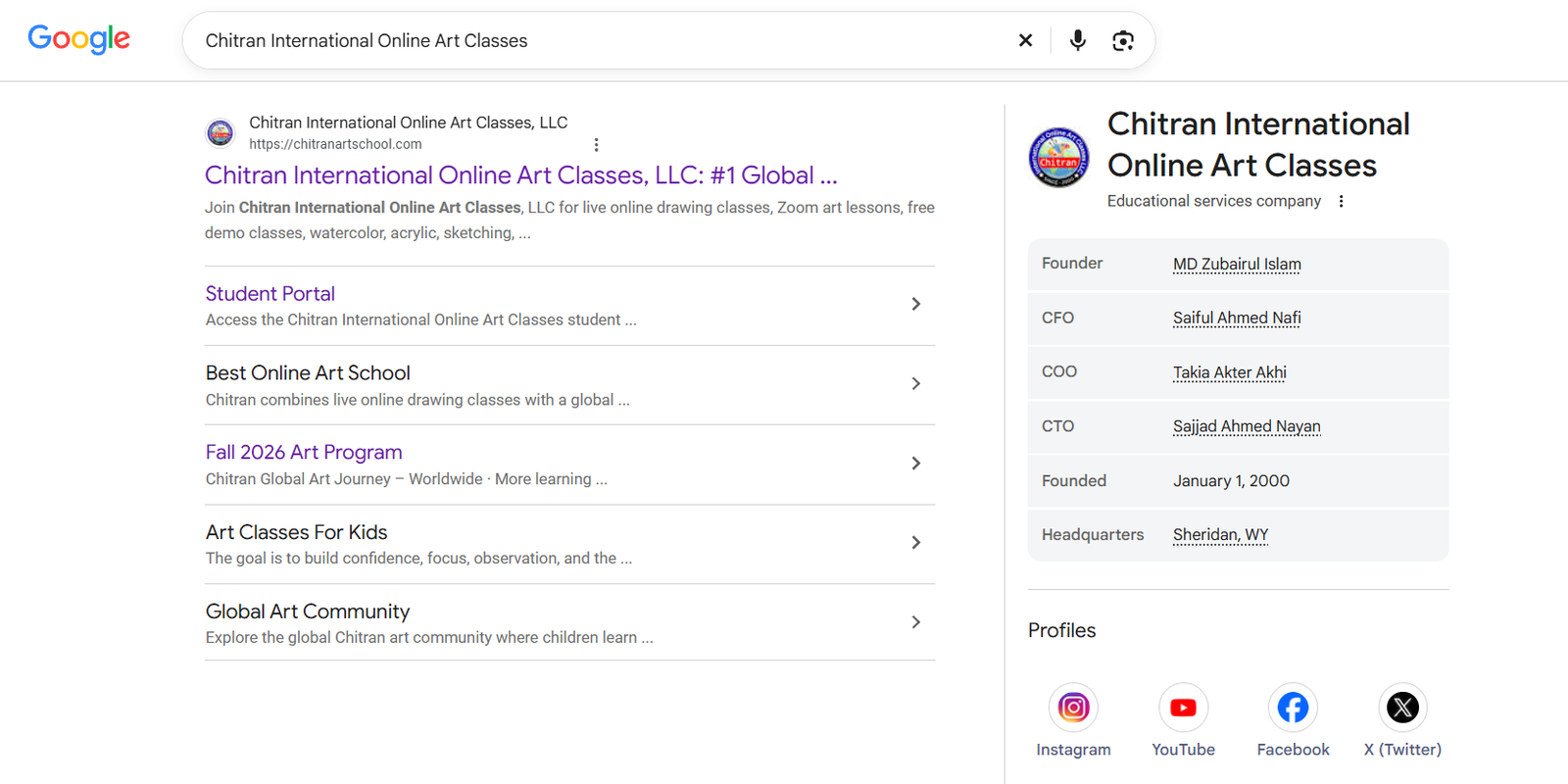
Chitran International Online Art Classes, LLC is now represented in a Google Search knowledge panel. For parents exploring live online drawing and art education, the panel provides a quick visual starting point: the Chitran name, company category, website, and other associated information in one place.
The panel shown in the screenshot appears beside search results for Chitran International Online Art Classes. Its direct Google Search link uses the Knowledge Graph identifier /g/11xzhr1m53. This article explains the update in plain language, shows how to find the panel, and helps families interpret it responsibly.
What is the Chitran Google Knowledge Panel?
A knowledge panel is an information box Google may show when someone searches for an identifiable person, place, organization, or other entity. Instead of making a visitor piece together the entire search page, it gathers a snapshot of the subject on the results screen. For an organization, that snapshot may include its name, category, website, images, profiles, and other facts Google associates with it.
In the supplied screenshot, the right-hand panel names Chitran International Online Art Classes and labels it an educational services company. The panel also shows the Chitran website and profile links. The search result on the left includes links to Chitran pages such as the Student Portal and art-class information. These visible connections make it easier for a parent to recognize the brand and continue to the right site.
Google says knowledge panels are generated automatically from information across the web. The panel is a Google Search feature, not a page that Chitran designed or placed manually. Its contents may be refreshed as Google's understanding and sources change.
How to find Chitran's panel
If you want to see the panel yourself, the most direct route is the Google Search link for Chitran's panel. You can also search Google for “Chitran International Online Art Classes” and look for the organization information box. Depending on your device, Google may place the panel alongside results, beneath them, or in a different layout.
- Open the direct Google link. It includes the ID
/g/11xzhr1m53, which points to the Chitran entity in Google's results. - Read the name and website carefully. Confirm that the site shown matches chitranartschool.com before entering any personal information.
- Use the panel as a starting point. Visit Chitran's own pages for current class offerings, teacher interaction, schedules, and a free demo.
- Compare current details. Search results can change; verify any date, person, policy, or program claim with the organization when it matters to your decision.
What does /g/11xzhr1m53 mean?
The sequence /g/11xzhr1m53 is the Google Knowledge Graph identifier used in the link provided for the Chitran panel. It is a way to point to a particular entity result. It is not a registration number, school license, academic accreditation, or proof that a business has passed a Google quality assessment.
Identifiers are useful because names can be similar. A parent might search for “Chitran,” “Chitran Art School,” or the full legal name. The direct link gives an unambiguous route to the result associated with the supplied ID. The most useful next step is still to check the destination website and read about the actual classes.
Why this update matters to families
Choosing an online art school for a child usually takes more than one search. Parents may want to know whether classes are live, how teachers help students, which ages are served, and what kind of drawing practice follows each lesson. A knowledge panel can reduce the first bit of friction: it brings the Chitran name and key web destinations into a recognizable search display.
That visibility is valuable when a family is trying to distinguish Chitran's own site from unrelated results. It can also connect the company name with its broader public presence. But the panel alone cannot tell you whether a class pace will suit your child, how much feedback a teacher gives, or whether a particular schedule fits your home. Those questions are best answered by reading the current program details and experiencing a class.
A sensible parent checklist after seeing the panel
- Open the website displayed in the panel and confirm the address before booking or submitting information.
- Look for a clear explanation of live teaching, student participation, lesson structure, and the age range served.
- Ask how students show their artwork to a teacher and receive feedback during a session.
- Check present-day prices, times, cancellation terms, and what materials a beginner needs.
- If available, use a demo class to judge the learning experience directly rather than relying on a search result alone.
Google visibility and art education are different stories
It is natural to celebrate a new presence in Google Search. A panel can make an organization easier to discover and can help people navigate to official pages. Yet search visibility is not itself a measure of teaching quality. The classroom experience remains the important question for parents and young artists.
Chitran's educational approach centers on live interaction and structured drawing practice. In a live lesson, a student should have room to observe, try a technique, ask a question, receive a useful response, and make a deliberate improvement. Over time, repeated attention to line, shape, proportion, color, composition, and creative choices gives a child more than a collection of one-off finished pictures. It gives them tools they can reuse.
For a family, the practical value of discovering Chitran through Google is therefore a path, not a verdict: find the right site, review the program, talk through your child's needs, and see the teaching in action. The knowledge panel makes that path easier to start; it does not replace it.
Questions about the Chitran panel
Is the Google Knowledge Panel an endorsement?
No. Google describes knowledge panels as automatically generated information displays based on sources across the web. Their appearance does not mean Google recommends, certifies, or accredits a company. Chitran's panel is an important search presence, but families should evaluate classes on their own merits.
Is a knowledge panel the same as a Google Business Profile?
No. They can look similar, but Google distinguishes knowledge panels from Business Profiles, which are designed for businesses serving customers at a location or within a service area. The screenshot and supplied entity link concern the knowledge-panel result described here.
Can information in the panel change?
Yes. Google says knowledge panels can update automatically as information on the web changes. Screen layout can also differ across devices and regions. Treat the image on this page as a record of the displayed result, not a guarantee that every field will always appear the same way.
What is the direct link to Chitran's panel?
The supplied link is google.com/search?q=&kgmid=/g/11xzhr1m53. If the display differs, search the complete organization name and confirm the official website shown in the result.
Does the panel guarantee a particular Google ranking?
No. The panel identifies an entity in search, but it does not guarantee that every query will show the same panel or that a particular page will rank in a fixed position. Search results depend on the query and Google's systems.
What should a parent do next?
Visit Chitran's website, review the current art-class information, and consider a free demo to see whether the live teaching style fits your child. Use independent questions about class format, feedback, curriculum, and schedule to make the decision.
See the classes behind the name
Chitran International Online Art Classes, LLC invites families to explore live, structured drawing lessons and decide whether the experience suits their young artist. The Google panel can help you find Chitran; a real class helps you understand how your child will learn.
Book a free demo